Your website content should increase traffic to your site, generate leads and links, and convert visitors to paying customers. Here are a few simple tools to help you determine if your content is serving its purpose.
Keyword Numbers vs. Keyword Use
Many companies build their content around “optimized” keywords to increase traffic to their site. Google’s Adwords Keyword tool is a popular way to search for the right words. Entering a generic search term like “construction” will provide a list of keywords. Construction company shows 1 million Global Monthly Searches and 450,000 Local Monthly Searches. These numbers reflect searches that include all sorts of other words such as “best” or “jobs” that were added onto the original term – construction company. To get true keyword counts from the Adwords tool, try this.
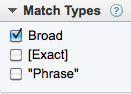
Under the keyword search box select:

On the left column in the Match Types box, change the default setting from Broad to Exact. Try it again by selecting Phrase. You will see the numbers drop to reflect the exact terms and phrases people enter into the search box.
These are the keyword terms you want to build your content with to increase traffic to your site.
Who is Linking to What Content
Some sites create content just in order to build links. Is anyone linking to your site? What about links on your competitor sites? Find out using SEOMOZ Open Site Explorer, a link analysis tool. Enter your URL or a competitor URL in the address box. Review link data on the Top Pages tab and Full List of Link Metrics tab.

Generating Leads With Content
Including links to blog posts, eBooks, whitepapers, brochures, coupons and landing pages can give you quantitative data on the level of visitor interest.
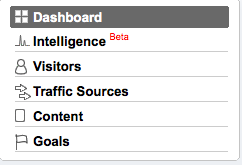
Google Analytics will show how many new and returning visitors came to your site and how extensively they interacted with your content. But do you know which companies are visiting your site and what content is engaging them? From your Google Analytics account Select View Reports to access the Dashboard. From there select Visitors > Network Properties > Service Providers. You will see a list of companies visiting your site. Add filters to refine this list.
Convert With Content
Which pages have created the greatest conversions and on what pages did visitors act on the call to action? From the Google Analytics Dashboard select Content > Top Content to see how each of your website pages is performing. You will find the average time on site, page views, and bounce rate but also check out the metric under $ Index. This metric offers a way of ranking the content by page. Your page $ index will show what pages are converting. Create custom reports from the Dashboard using Goal > Total Conversions and Conversion Rate to get more precise information.
Content can be improved over time as you learn what works and what doesn’t. Knowing this allows you to make smart decisions when it comes to your website content.