Google Nightmare of the Worst Kind

A Google NightmareThis past month I have spent several hours trying to fix a Google nightmare caused when a client lost access to their Google AdWords account. In the eyes of most small business owners there is Google confusion. Between Google Places, Google AdWords, Google Analytics, Google+ and Gmail, businesses may be using multiple business as well as personal accounts. People sometimes get confused about what account is set up with what Gmail address. In their haste to delegate tasks to someone else, they end up losing access to their account.

My client came to me because they were getting increased charges for Google AdWords, yet they had no idea how to access the account to control their campaign costs. Their account was automatically billed to a credit card.  Armed with the credit card number, I was able to get Google to confirm the Gmail address used to set up the account, but then we didn’t have the password. To reset the password Google was going to send a pin number to a backup phone number, only the phone number used to create the account didn’t belong to the business, or either of the two owners. Turns out the phone number belonged to the business owner’s daughter who worked at the firm for a few months. To reset the password we needed to get the pin number that was texted to her personal phone. Now we are trying to determine if the information from Google Adwords can be moved to another account.

If you have ever tried, you know that reaching a live person from Google is not easy. They try to answer all questions on their website and hide their phone numbers pretty well. I found one, and to Google’s credit, I was connected with someone from their AdWords department who has been very helpful.

Business owners need to recognize that their website, google analytics and social media accounts, contain valuable information for the business and need to be maintained and protected.  You need to keep control over them, and that means properly managing the accounts. To keep you from something like this happening, here’s my advice to business owners on setting up your Google account.

1)Start by creating a Gmail account for the business. Keep this separate from any personal accounts. This is key, because the business should stay in control of the account. You can provide permission to others to access the account, but you main control over the password for the account, and can deny access, if you desire. Write down the password, the back-up email and backup phone number for the business , and answers to security questions. Don’t let employees or outside agencies use their personal Gmail account or cell phone as the backup.

2)Tie all Google products to the same Gmail account. You want Google Adwords to tie into Google Analytics so you can see how your advertising is impacting website traffic. You can authorize others to be administrators or users on the account using their own Gmail accounts.

3)Google Places is now Google+ Local. Keep you Google Places Business Account separate from your personal Google+ account.

4)Keep all account user names and passwords on one simple spreadsheet.
Include the following:
Website hosting website, login and password
Google analytics UA Number
Company gmail address and password
Blog login address, user name and password
Blog RSS Feed
Twitter login and password
LinkedIn login and password
Facebook login and password
Pinterest login and password
Email Marketing login and password

Do you have a Google nightmare to share?

Google Places Out, Google+Local In

Google announced the launch of Google+local this week — a move which effectively converted more than 80 million Google Places pages into Google+local pages. So, if you didn’t get around to creating a Google+ page yet, you can thank Google for getting you started.

Local information integrated across Google

Of course, there’s a reason for all this, not the least of which is to gain more traction for Google+.  Users can now click on the new “Local” tab on the bottom left-hand side of Google+ to search for specific places or browse for locations. If you click on a restaurant, or a place, you’ll be taken to a local Google+ page that includes photos, Zagat scores and summaries, reviews from people you know and trust, and other useful information like address and opening hours.

As part of the move, Google replaced its five-star review system with the Zagat 30-point rating scale. Google has also added depth to the reviews by adding ratings on service, atmosphere and the like. Individual scores will be rated on a zero to 3 point scale, averaged and then multiplied by 10 to create an average score where 26-30 is near perfection and 0-9 is poor to fair.

26-30Extraordinary to perfection
21-25Very good to excellent
16-20Good to very good
10-15Fair to good
0-9Poor to fair

What’s a business to do?

For now, according to the Google and Your Business Blog, businesses should continue to update their company  info via their Google Places page, but eventually this will be phased out. If you already had a Google+ business page, you might check to be sure you don’t have two.

If you are a business owner, you should continue to manage your information in Google Places for Business,”said Jen Fitzpatrick, VP Engineering, in the Google and Your Business Blog. “You’ll still be able to verify your basic listing data, make updates, and respond to reviews. For those who use AdWords Express, your ads will operate as normal as they’ll automatically redirect people to the destination you selected, or your current listing,”

Implications for local search

There is good news for savvy marketers who have already mastered Google+ because now these pages will be indexed and available across across all Google properties including search, maps and mobile. If you haven’t yet started on Google+, now is a great time to start. But like it or not, your low maintenance Google Places page is now a full blown social media site that needs your attention. Its time to expand your social circles, encourage reviews and engage your followers with great content. Google+ is flexing its local muscle.


Eight Easy Ways Contractors Can Optimize Content for Local Search

Local Content Helps Contractors Get Found OnlineTo beat your competition in local search, contractors need to find ways to incorporate local content on their websites as well as on third party sites where their businesses are listed.  This might sound more difficult than it really is. Here are a few suggestions:

1) Put your physical address and phone on every page of your website.

2)Add city, state or neighborhood data to all of your construction project photos.

3)Add city and state info to your customer testimonials.

4) Promote your involvement with local charities and business organizations online through press releases.  Use location names in the headlines.

5) Create a page for each location of your business and be sure to include it on the site map you submit to search engines. Each page should feature unique images and information pertinent to the location. Maps and directions are useful geographic content.

6) Claim your business on search engine directories such as Google Places, Yahoo! , Bing and the Yellow Pages as well as B2B directories, if that is your target audience. Enhance your listings with photos, graphics and links to social media sites, where available. Be sure to include the cities and suburbs you will serve. A convenient way to find out if your business currently appears in these directories is to visit www.getlisted.org. It will give you a full report in just a few seconds and links directly to where you can update your information.

7)Blog posts are the perfect way to  add geographic emphasis to headlines , so you can rank higher with search engines. Whenever you post a project photo or news item, don’t forget to mention the location. This ensures the local keywords show up in the <title> tag, where Google and other search engines pull content from.

8)Claim your listings on review sites such as Angie’s list, Yelp and Google Places. Encourage reviews by adding badges to your website and e-newsletter.

A Good Example of Local Search Optimization by a Contractor

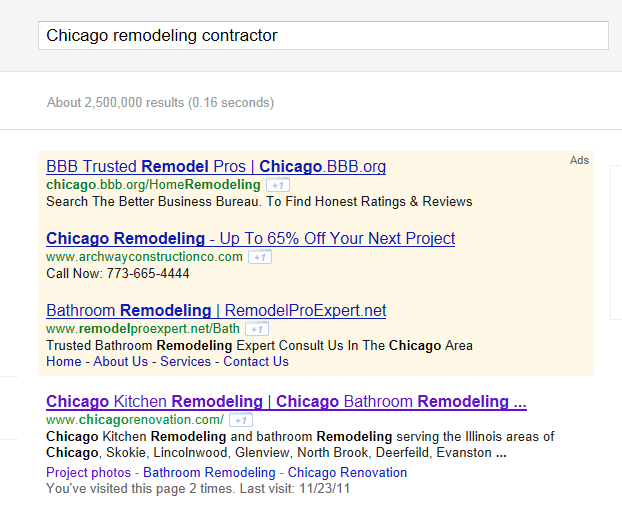
If you want to see a good example of a contractor website that is optimized for local search visit Chicago Renovation Development.  They came up No. 1 in my search for “Chicago remodeling contractor.”

Google Search for "Chicago Remodeling Contractor"
Chicago Renovation Comes Up No. 1 in My Search for "Chicago Remodeling Contractor

The home page includes location-based content focused on Chicago remodeling. In the footer of each page are three links to” leading Glencoe Remodeling Contractor,” “Highland Park Remodeling Contractor” and “Winnetka Remodeling Contractor.” Click on any of these and you will find a page of unique content, as well a complete listing of service areas. A badge for reviews  is a highlight on the home page.

Type in a relevant local search term for your business and it is easy to see who is doing it well among your competition.  With an estimated 20 percent of all searches (40 percent of local searches) made with local intent, you don’t want to miss this opportunity. Put these painless and highly cost-effective ways to improve your local search engine rankings on your to-do list today.