
When it Comes to Home Page Design, Think Fast

stop watchAccording to web usability expert Jakob Nielson, website visitors will typically spend less than 20 seconds reading a web page. A serious B2B buyer has no time to spend on irrelevant or difficult to navigate websites. Time is of the essence. As a B2B marketer, you need to make those seconds count.  In 20 seconds or less you need to build trust with B2B buyers, communicate what your firm does, and explain how you are different or better than your competition. Here are four ways to make your home page communicate fast.

Use Visuals to Communicate Faster than Words

What markets are you focused on? Who recommends you? What do you want me to do next? These are all questions that potential customers want answered quickly.  Visual images communicate the answers faster than words. What is your visual content strategy?Photos can show your involvement in specific industries.  Recognizable logos from organizations such as the Better Business Bureau, Angie’s List or trade associations show visitors you are a reputable firm. Graphic buttons and design point the way to the next click.

Cut Your Copy: Concise Copy Performs Better

Who is your firm and what do you do? Leave generic taglines, industry jargon and a lengthy list of services in your briefcase. Be concise and specific about what you do, including the keywords you believe people are searching for. Cut out unnecessary “marketing speak” that isn’t fact-based. In usability studies conducted by Nielson, users found shorter versions of web pages–with 54% less text–more complete than longer versions.

Make it a Quick Read with Copy Users Can Scan

Studies show website visitors don’t read, they scan. To quickly communicate, focus on benefit-laden headlines and keep paragraphs short. Highlight keywords and other information in bold. Utilize bullets or numbered lists to make scanning website copy easier.

Avoid Information Overload

Resist the urge to add more content to an already crowded home page. Instead, reorganize content into easy-to-digest chunks. Keep the 20-second time frame in mind when deciding what should stay and what should go.

Remember less is often more in online communications.
Website Usability Takes a Team Effort

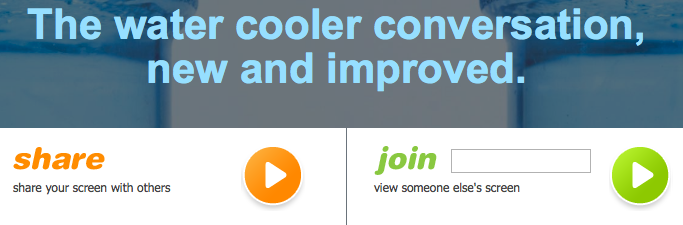
I clicked on a link in the margin of an article I was reading and was brought to this website page:

Usability screen capture

I’m tired of not knowing what to do on websites. It makes me feel stupid and frustrated. What is supposed to go in that “join” box? Would you continue by pressing the arrow button? I didn’t.

This brings me to a favorite subject – the usable website.  If your website can’t be found, is located on an unstable platform, offers no visual appeal, or is hard to understand and navigate, usability goals for the website are not being met. It is unlikely that one person can design a usable website. It takes a team. The following team members can get you where you want to go.

Project Manager

This person whatever their background needs to have a holistic view of the project. They create a logical schedule of events and deliverables. He or she will identify team members and their roles in creating a usable website.

Content Writer

A good content writer knows how to write text that is easy to read, understand, and skim. Often only a third of online text is actually read. A content writer knows these reading patterns and how to trim existing text into meaningful, usable language.  The length of a sentence and word choice placement all effect readability and comprehension. Research shows that bullet points and subheads are effective ways to chunk content so it gets read.

Graphic Artist

The visual layout of a page provides a first impression. When it is appealing visitors tend to explore. If not, they leave. Good graphic artists understand the impact of color, the weight of elements to direct attention, line spacing, and the power of white space.

Web Developer

Well-trained web developers apply their skills in creating software applications that are robust. They use business logic to manipulate data and/or customize the visitor’s experience. Sometimes referred to as software engineer, webmaster or web designer they make websites usable by optimizing them for a good visitor experience.

Photographer

I include photographers on the team for their ability to create a truly customized experience.  When it’s important to show products, people, and environments a photograph can convey who or what you are. Reverting to stock photos is ineffective; people ignore them.

End User

Don’t forget those who will be using the site. Find a customer or objective trusted source to report back on what their experience was in using the site. Were they able to find what they needed? On a scale of 1 to 10 how would they rate the experience? A customer survey should be created to capture this information. At least one of the team members above, usually the content writer, should be a strong user advocate.

The priorities of individual team members cannot obscure the vision for what should be a well-integrated online presence for a business and its visitors. Creating a usable website is a collaborative undertaking. Assess the skills needed beforehand to determine if one team member without the other will get you and your website visitors where they need to go.