Address Fear of Change With Benefit-Filled Content

An article by August Turak titled “Three Keys to Competing” got me thinking about competition in a new way. Turak describes the levels of competition as direct (other suppliers), indirect (budget constraints), and procrastination (fear of change).  “…the most insidious, most often neglected and hardest to overcome” is procrastination, he writes. Rather than buying from a competitor, the prospect does nothing.

What kind of content can address your customers’ fear of change? Try these approaches to help them act with confidence.

Understand Change is Not Easy

My computer was several years old with little storage space left on the hard drive and running very slow. Still, I waited. Learning something new requires time and attention. A long time PC user, I decided to buy a MacBook Pro. The processor was fast. I would have additional connectivity that includes HD video calls, and better graphics. These features were easily translated to benefits for me.  I was able to call an Apple specialist who answered my questions through the number provided on the website. The content reads:


Follow Up With Ongoing Training & Support

The initial frustration of learning something new can be substantial. I suddenly became an amateur computer user after years of being an expert.  I purchased the One on One support program for $99. This gives me access to the online tutorial and allows me to attend the One on One workshops at my local Apple store. Many of my frustrations were eliminated. I continue to refer to the online tutorial and attend the workshops to expand my understanding of what I can do with this computer.  Apple makes it easy for customers to get support:


Anticipate the Benefits

Everyone wants a product or service that makes life better and easier. Apple seems to be anticipating my next purchase on their Home page:


Having the same content available on multiple devices is of great benefit. The automatic aspect tells me I won’t have to spend hours setting it up. I am now anticipating the benefits of change rather than fearing it.

How does your content address customers’ fear of change?
What’s On Your Content Menu?

What content choices have you made lately? Visitors to an online site see the final presentation. Before the first pair of eyes sees your content, strategic decisions were made to make it effective and engaging.

Do your prospects prefer data or information?

Data is raw material, just the facts. ThomasNet.com provides current product data for manufacturers. This is the online reinvention of the venerable Thomas Register. The site delivers a simple way to navigate products and vendors. Their microsite, Promote Your Business, offers advice on content marketing. This page and their downloadable white papers are informational. They’ve processed the data, organized it, and provided context.

Is the content easily digestible?

Usability expert Ginny Redish says good web writing let’s people “grab and go.” She suggests presenting information in pieces for different users, different topics and different needs to help visitors grab what they need and move on to what’s next.

Is it customer centered?

More and more web content is replacing the word “we” with “you”. Rather than “We provide such and such services …” it reads, “Learn how you can ….”

Do you offer variety?

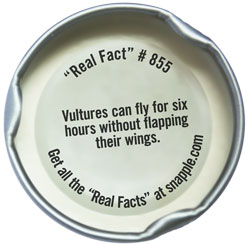
Consider Snapple Tea’s Real Facts. In the space of a bottle cap, the company has included data (Real Fact #), information (the fact itself) and a call to action (Get all the “Real Facts” at Snapple.com).

The company says Real Facts offers consumers a “chance discovery and momentary amusement.” Those  amused can go to the Snapple website and see all the retired Facts. There is an enthusiastic Facebook Page for cap collectors and a company twitter feed that rewards followers with virtual caps for spreading the word. You can even get Real Facts sent to your phone.

Your content menu will continue growing as you think of new possibilities.

How to Measure and Reduce Website Bounce Rates

Do you know how many visitors come to your site page and leave without viewing other pages? In the world of web analytics this measurement is called the bounce rate. In practice a likely scenario is people enter a search term in their browser, open the page, realize it isn’t what they want, hit the “back” button and continue with their search.

How to Measure Bounce Rates

There is no single tool or source to answer all your web analytics questions. But quantitative data on bounce rate is easy to find. You can learn how visitors arrive at your site, what they do while there, and a history of your bounce rate per page using Google Analytics or Yahoo Analytics, both free. In Google Analytics under Traffic Sources> All Traffic Sources on the left sidebar, each source page is measured with a percentage bounce rate. The average of these sources is the site bounce rate. If your bounce rate is 70% that means 70 out of 100 visitors are not engaging with your site. Watch for trends.

How to Reduce Bounce Rate

The average bounce rate on a site is 50%. Reduce your current bounce rate by implementing these ideas.

  • Learn what people are looking for on your site. Include a search box. Google Site Search is an affordable subscription service based on the number of queries received each year.
  • Use relevant keywords in headlines. They should describe the content well and be easily found by search engines. Try offering viewers two versions of the headline and see which one gets the most clicks. Add names, places and other relevant information that your audience wants to read in the text. See my previous post Collecting, Creating and Distributing Content that Matters.
  • Include contextual links. Look on the Mashable website. The article How Agencies are Spending Online Media Budgets includes links at the bottom under More Business Resources. These links lead to articles on ad agencies and social media. Linking to relevant topics and previous blog posts requires human intervention. Context cannot be automated.
  • Check to see how your pages appear in various browsers. Test the speed of each.
  • Offer a personalized experience. Encourage users to share ideas. Add surveys and polls. Include tools that allow them to talk about your products and share across social networks. Facebook CEO Mark Zuckerberg talks about the potential of “products built around people.” Alltop.com is an example of customization that allows visitors to create their own “online magazine rack.”
  • In most cases, do not link to your Home page. It is a sure way to aggravate people.
  • Design elements can influence bounce rate. Minimalist, purposeful “call to action” pages are effective in getting viewers to engage. Get rid of distractions including heavy images and pop ups.

Experiment and be patient. You won’t see results over night. Give it two weeks and measure your rate after implementing these ideas. Take notes on what you tried and what was effective. Let me know what results you get.

From Glut to Glam

Stop. Take a hint from a road sign and understand the power of a word. Brevity gets attention. Precious minutes are wasted listing reasons to stop or giving instructions on how to stop. In its aloneness, Stop is powerful.

Brevity ensures that a reader gets the message. This trend is taking hold at companies large and small. On the website of Kraft Foods a five word headline, five short sentences each with a link, and a six-topic menu bar introduces the viewer to the company.

At the Pepper Construction Group, a general contracting construction management firm, the Home page contains a four-word headline and triple menu bars: one at the top by location, near the bottom by topic, and at the bottom with subject icons. News links are included. This information design is ingenious.

Emphasis Gets Lost When Overstated

On these sites nothing is overstated. It appears glamorous in its constraint compared with the glut of information most people see each day. Sensibilities are soothed rather than taxed. Information designed in small chunks like this is functional. A practical reason to limit word count is the click through. When introductory words are of interest to readers they act. Their click through is measurable.

When a not so prominent lawyer’s bio runs 851 words, perspective is needed. MicroSoft’s chairman of legal affairs wrote his bio using 421 words and Chicago’s largest and most prestigious law firm’s chairman uses only 326 words. It is a conversation. Don’t go on and on. Stop.

The Smart Ideas File

As a content writer and strategist I go through a lot of information every week. I rely on my own systems (using various methods for filtering the glut including Google Reader that I described in another post). I keep them in a “Smart Ideas” file. I remember some content from mere memory. Smart ideas don’t grow easily but this week’s plums were there for the picking.

From the Supply Side Community forum Alissa Marrapodi, managing editor for Inside Cosmeceuticals, writes:

“The consumer is driving the cosmeceutical market. No longer are manufacturers introducing niche markets and suggesting consumers’ needs proactively; but the consumer is putting their demands out there via social media, etc., and manufacturers are now reacting and responding to consumers. The shelves are not setting the trends; consumers’ demands are…A total of 63 percent of purchasing is driven by beauty blogs.”

From Seth Godin’s blog post on How to be Interviewed:

“If your answers aren’t interesting, exciting or engaging, that’s your fault, not the interviewer’s. “ He also says that interviewees don’t need to take every question posed literally. Redirect and talk about what you care about.

From a live conversation with Investment Banker Doug McConnell:

After a meeting with owners of a B2B company start up, Doug said to me: “It’s good to have an outside source filtering industry information to them. Entrepreneurs tend to become insular, only seeing what they want to see.”

Questioning Smart Ideas

Sometimes I ponder questions posed in an article, even when it’s the smartest sounding idea. In her article, A Better Way to Get Vitamins, Anita Marlay, R.D., L.D. writes: “Really, wouldn’t eating an orange for a snack make better sense than eating a processed fruit snack with added vitamin C?”

It would seem so, but another choice is emerging through the fast growing Functional Foods industry. Commercial organic farm operators that pick fruit when it’s ripe and freeze dry it immediately can create powerful antioxidant rich compounds. New ORAC (total antioxidant capacity measurement) tests show a fresh plum has an ORAC value of 9.49 (per gram); compared to a dried plum (prune) with an ORAC value of 57.7 (per gram). The same is true of grapes. Fresh grapes have an ORAC value of 4.46 (per gram) versus dried grapes (raisins) which have an ORAC value of 28.3 (per gram).

What makes sense is that drying removes the water and concentrates the antioxidants. Bio technology firms are positioned to partner with companies to offer new food or beverage products that are not only convenient but lend scientific support to the effects of added nutritional ingredients. That’s a long answer to her question, but sometimes it’s good to stop and think about what you know.

Do you have a smart ideas file? How do you retain those you’ve read or heard?