Lessons to be Learned from Pinterest’s Success

Lessons Learned from PinterestPinterest is taking the social media world by storm.  The site that allows members to “pin” images, videos and other objects that they love to their pinboard, skyrocketed to No. 3 behind Facebook and Twitter, according to a recent released Experian Marketing report.  With predominantly female members, the site has a different audience profile than other social networks.  The most popular categories on the site include home, arts & crafts, style/fashion, and food.  According to RJ Metrics,  food is the fastest growing category on the site and the most likely topic to be repined. (Take note food service marketers).

The simplicity of sharing Information is key to Pinterest’s success. Pictures communicate quickly and easily.  Organized by topic, rather than social connections, Pinterest makes it easier to share with more people.  There are some lessons B2B marketers can take away from Pinterest’s success.

Add Visual Interest to Your Brand

Work to improve your brand’s visual interest. Photos and graphics draw attention. Look for interesting ways to showcase your products. Photograph products being used in different environments, create a video, or ask customers to share their images. Develop a visual content strategy.  Never miss a photo opportunity. Use professional graphic design to enhance copy and data. If sharing information or a report, create an attractive cover image to promote the contents.

Some shining B2B examples include Constant Contact , which adds visual interest with graphic design and GE, which uses stunning photography.

Make Sharing Easier

Consider adding sharing features to more areas of your website, so visitors can share  all types of content. Place sharing buttons close to content. Ask followers to share your content.

Will you be adding Pinterest to your social media buttons?

A Visual Content Strategy Engages Audiences

Establishing a visual rhythm recognizable across Internet channels requires a visual content strategy.  To be successful you need to identify who will be viewing the content, when and why, what story it conveys, where it will be located and for how long. You also need to know where the content will come from and how it will be updated and measured.

Designate Who Visuals are For

Are you hoping to connect with a specific audience or highlight a particular product? The FoodBev.com website does both by including a segmented audience menu. The graphic icons to the right of the website name include audio interviews and podcasts, video, photo gallery, calendar of events, magazines, newsletter, knowledge base and profiles. That’s a lot to offer in a small space.

Menu with audience segmented and graphic icons

The video and podcasts displayed on this site are created by staff, contributors and industry sources. They are updated regularly. The number of “hits” each receives tells the site manager what visitors are most interested in viewing.

What Visuals Convey

Visuals in the form of logos, icons and colors support a company’s brand and should be used consistently on all Internet channels.

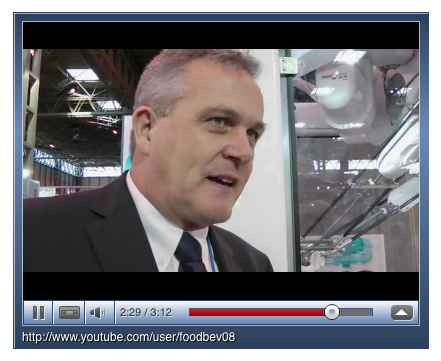
Visuals including video can tell the story you want to convey. Be consistent in matching your production and tone with the content. You may not need a slick video production of a customer in the street interview but you may need it when interviewing the company CEO. To avoid talking heads put the person in an environment that tells a story. The video camera can move from the talker to an action shot as shown in the video below.

Talking head in an action environment

Brian Bell Sales Manager at Pacepacker Services demonstrates the 6-Axis Pick & Place robot on the FoodBev.com website.

Decide Where & When to Use Visuals

Will the audience be viewing visual content on your website, an industry site, webinar, newsletter or social media link? Knowing this in advance helps you tell the story in an appropriate way. Understanding where the prospect might be in the buying cycle is important as well. The video above is an introductory piece to a new product that shows what it does, not the engineering or precision control statistics a ready to buy prospect may need.

Understand the Why of Visual Content

All content needs a reason. Why include this on your site? What do you hope the visitor will get from it and take away? Visual content needs to meet the audience’s information expectation. Review your analytics to see how well the visual content is being engaged with by visitors.

Knowing How

Graphic artists, videographers and other visually gifted professionals can translate your message to the appropriate media. But how long do you use these visuals? Visuals that include out of date information may misguide and offer little to the viewer. If you don’t have time to swap in new visuals strive for “evergreen” content that remains valuable for long periods. Interview profiles of top executives on the About Us page are an example. Evergreen content can be supplemented with additional visuals at appropriate times.

Variety Invites

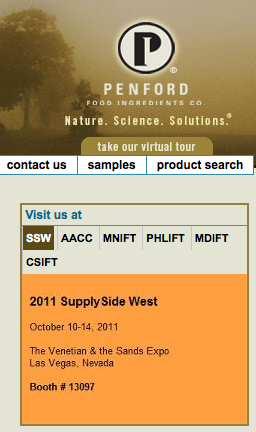
clickable calendarThe clickable calendar on the Penford Food Ingredients Company site shows they are active in industry events but it also invites visitors to engage with them.

Visuals can take on lots of forms including infographics (charts & graphs) that are easily understood and accessible for website visitors. A visual content strategy will keep your visitors engaged and meet your business objectives when planning is at the forefront.