Useful Resources for Creating Social Media Guidelines

Federal Trade Commission LogoIn 2010, the Federal Trade Commission revised its Endorsement Guidelines to include social media. What is said on blogs and social networking sites  now is not just a matter of ethics, it is the law.  The revised guidelines focus on three areas:

1) Endorsements must be truthful and not misleading

2) If the advertiser doesn’t have proof that the endorser’s experience represents what consumers will achieve by using the product, the ad must clearly and conspicuously disclose the generally expected results in the depicted circumstances; and

3) If there’s a connection between the endorser and the marketer of the product that would affect how people evaluate the endorsement, it should be disclosed.

As a marketing manager it is your responsibility to  protect your company from all of the legal implications of social media. This is best done by establishing a social media policy and by ensuring that all internal departments involved in social media as well as external agencies, consultants and contractors are aware of the policies.

Fortunately, there are a number of resources available to help.

SocialMedia.org recently updated its Disclosure Best Practices Toolkit, which includes a series of checklists to help marketers formulate a social media policy.

In addition to publishing the Endorsement Guidelines, the FTC also published a document which covers commonly asked questions about the guidelines.

View the video for a quick overview.

Do you have a question concerning disclosure or developing a social media policy?  Submit your questions to jcostin@contentforbiz.com.

Is Your Website Content Working?

Your website content should increase traffic to your site, generate leads and links, and convert visitors to paying customers. Here are a few simple tools to help you determine if your content is serving its purpose.

Keyword Numbers vs. Keyword Use

Many companies build their content around “optimized” keywords to increase traffic to their site. Google’s Adwords Keyword tool is a popular way to search for the right words. Entering a generic search term like “construction” will provide a list of keywords. Construction company shows 1 million Global Monthly Searches and 450,000 Local Monthly Searches. These numbers reflect searches that include all sorts of other words such as “best” or “jobs” that were added onto the original term – construction company. To get true keyword counts from the Adwords tool, try this.

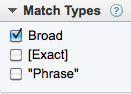
Under the keyword search box select:

On the left column in the Match Types box, change the default setting from Broad to Exact. Try it again by selecting Phrase. You will see the numbers drop to reflect the exact terms and phrases people enter into the search box.

These are the keyword terms you want to build your content with to increase traffic to your site.

Who is Linking to What Content

Some sites create content just in order to build links. Is anyone linking to your site? What about links on your competitor sites? Find out using SEOMOZ Open Site Explorer, a link analysis tool. Enter your URL or a competitor URL in the address box. Review link data on the Top Pages tab and Full List of Link Metrics tab.

Generating Leads With Content

Including links to blog posts, eBooks, whitepapers, brochures, coupons and landing pages can give you quantitative data on the level of visitor interest.

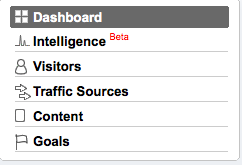
Google Analytics will show how many new and returning visitors came to your site and how extensively they interacted with your content. But do you know which companies are visiting your site and what content is engaging them? From your Google Analytics account Select View Reports to access the Dashboard. From there select Visitors > Network Properties > Service Providers. You will see a list of companies visiting your site.  Add filters to refine this list.

Convert With Content

Which pages have created the greatest conversions and on what pages did visitors act on the call to action? From the Google Analytics Dashboard select Content > Top Content to see how each of your website pages is performing. You will find the average time on site, page views, and bounce rate but also check out the metric under $ Index. This metric offers a way of ranking the content by page. Your page $ index will show what pages are converting. Create custom reports from the Dashboard using Goal > Total Conversions and Conversion Rate to get more precise information.

Content can be improved over time as you learn what works and what doesn’t. Knowing this allows you to make smart decisions when it comes to your website content.

Address Fear of Change With Benefit-Filled Content

An article by August Turak titled “Three Keys to Competing” got me thinking about competition in a new way. Turak describes the levels of competition as direct (other suppliers), indirect (budget constraints), and procrastination (fear of change).  “…the most insidious, most often neglected and hardest to overcome” is procrastination, he writes. Rather than buying from a competitor, the prospect does nothing.

What kind of content can address your customers’ fear of change? Try these approaches to help them act with confidence.

Understand Change is Not Easy

My computer was several years old with little storage space left on the hard drive and running very slow. Still, I waited. Learning something new requires time and attention. A long time PC user, I decided to buy a MacBook Pro. The processor was fast. I would have additional connectivity that includes HD video calls, and better graphics. These features were easily translated to benefits for me.  I was able to call an Apple specialist who answered my questions through the number provided on the website. The content reads:


Follow Up With Ongoing Training & Support

The initial frustration of learning something new can be substantial. I suddenly became an amateur computer user after years of being an expert.  I purchased the One on One support program for $99. This gives me access to the online tutorial and allows me to attend the One on One workshops at my local Apple store. Many of my frustrations were eliminated. I continue to refer to the online tutorial and attend the workshops to expand my understanding of what I can do with this computer.  Apple makes it easy for customers to get support:


Anticipate the Benefits

Everyone wants a product or service that makes life better and easier. Apple seems to be anticipating my next purchase on their Home page:


Having the same content available on multiple devices is of great benefit. The automatic aspect tells me I won’t have to spend hours setting it up. I am now anticipating the benefits of change rather than fearing it.

How does your content address customers’ fear of change?

Six Things You Can You Learn from B-2-B Publishers

You’ve heard that everyone is a publisher now, so what can you learn from successful publishers.

B2B publishers have made a living off their ability to deliver  audiences, initially through print and now online. Long before there was SEO, publications knew that great content would bring them loyal readership. Publishers continue to be  go-to sources for information on industry trends, news,  leaders, research and best practices. And with more competition for a reader’s time from all sorts of sources,  today’s leading publishers are working harder than ever .  The draw is still great content. However, many magazine websites have been transformed from online versions of the  print product, into  rich sites that fully embrace multimedia and  social networks.

Now that you are trying to win over your own audience online with content, it makes sense to try and learn what you can from the pros.

1) Keep the needs of the customer/reader first and foremost.

It’s not about you and your company, it’s about your customer.  What are their problems and how can you solve them.

2)Be fair and factual.

Your audience knows you are trying to sell something, but that doesn’t mean you can’t be a credible, reliable, source of information. Stick to the facts and avoid “ad-like” promises and sales jargon.

3)Hire professional writers.

Subject matter experts who can also write are few and far between. They are usually too busy with other jobs to write. Instead of trying to rely on them, hire a professional writer who knows how to pull the information from your sources  and present it in a useful, usable and interesting format.

4)Keep a schedule.

As a reader, I  know when my favorite industry publication will arrive each month, and I look forward to it. The same is true of my InBox.  Whether you decide to publish content on a daily, weekly or monthly frequency, stick to a schedule.  Be aware that there’s a direct correlation between frequency of content and website visits.

5) Look for the best way to tell a story.

Does the story lend itself to video, radio or text?  PMQ’s Pizza TV is used to demonstrate a technique for rolling  a pizza crust over the shoulder. It just wouldn’t be the same in print.

6)Add value with social sharing.

Today’s publishing websites include more ways for audiences to connect and share ideas with each other. PMQ Pizza Think Thank forum is a reminder that your customers and prospects can create your content.  On techrepublic.com, social stats are front and center, helping the audience find  useful content fast.

As a content marketer you need to know how to succeed in publishing. Examine your favorite industry magazine websites with a fresh eye. What do you like about them?  How can you use that information to  engage your audience? What do you see on consumer magazine websites that could translate to B2B?

What’s On Your Content Menu?

What content choices have you made lately? Visitors to an online site see the final presentation. Before the first pair of eyes sees your content, strategic decisions were made to make it effective and engaging.

Do your prospects prefer data or information?

Data is raw material, just the facts. ThomasNet.com provides current product data for manufacturers. This is the online reinvention of the venerable Thomas Register. The site delivers a simple way to navigate products and vendors. Their microsite, Promote Your Business, offers advice on content marketing. This page and their downloadable white papers are informational. They’ve processed the data, organized it, and provided context.

Is the content easily digestible?

Usability expert Ginny Redish says good web writing let’s people “grab and go.” She suggests presenting information in pieces for different users, different topics and different needs to help visitors grab what they need and move on to what’s next.

Is it customer centered?

More and more web content is replacing the word “we” with “you”. Rather than “We provide such and such services …” it reads, “Learn how you can ….”

Do you offer variety?

Consider Snapple Tea’s Real Facts. In the space of a bottle cap, the company has included data (Real Fact #), information (the fact itself) and a call to action (Get all the “Real Facts” at Snapple.com).

The company says Real Facts offers consumers a “chance discovery and momentary amusement.” Those  amused can go to the Snapple website and see all the retired Facts. There is an enthusiastic Facebook Page for cap collectors and a company twitter feed that rewards followers with virtual caps for spreading the word. You can even get Real Facts sent to your phone.

Your content menu will continue growing as you think of new possibilities.